FirstWare Recover Pro 2004: System Recovery in Seconds
Features
By
Harald Thon
published
Add us as a preferred source on Google
Get the 3DTested Newsletter
Get 3DTested's best news and in-depth reviews, straight to your inbox.
By submitting your information you agree to the Terms & Conditions and Privacy Policy and are aged 16 or over.
You are now subscribed
Your newsletter sign-up was successful
An account already exists for this email address, please log in.
Subscribe to our newsletter
....Or For "Experts"
The Advanced mode features numerous setting options. The status window lets you see how many restore points have been created, and which type each is.
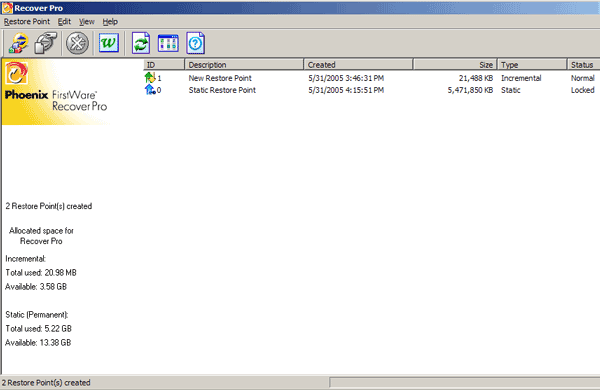
Advanced mode display
You can name or delete the restore points at will. You can also stipulate when restore points should be created.
Article continues belowThe Scheduler enables automatic backup
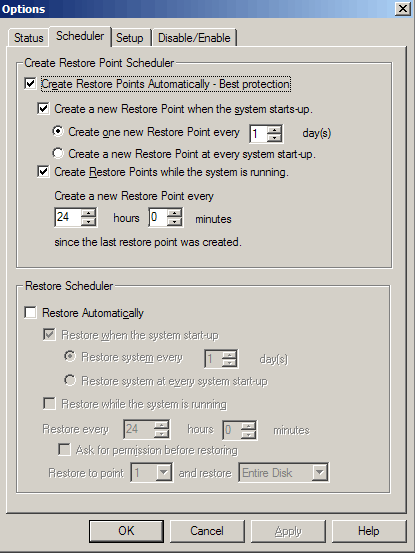
In the default setting, a restore point is created every time the system boots or at least once every 24 hours. This setting offers very decent basic security for your system.
Stay On the Cutting Edge: Get the 3DTested Newsletter
Get 3DTested's best news and in-depth reviews, straight to your inbox.
Current page: ....Or For "Experts"
Prev Page Optional Easy Backup Next Page Test 1: Complete System Backup
No comments yet
Comment from the forums

