Get 3DTested's best news and in-depth reviews, straight to your inbox.
You are now subscribed
Your newsletter sign-up was successful
An account already exists for this email address, please log in.
Subscribe to our newsletter
Editing With Stormedit
Stormedit. Click for a larger picture.
The square in the upper right-hand corner is the editing monitor. To the right are the individual clips, which you then place in order on the timeline and modify with effects or transitions. The lower section contains the timeline with its video and audio tracks.
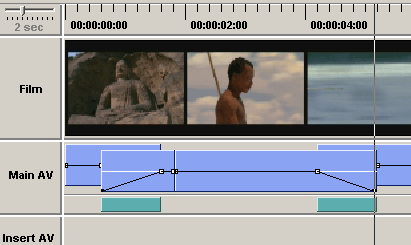
Timeline.
Article continues below
Users who have worked with Adobe Premiere will need some time to adjust to this timeline. We've put together three clips on the Main AV track, as you can see. The narrow bars on the bottom denote how long the selected effects will last.
Stay On the Cutting Edge: Get the 3DTested Newsletter
Get 3DTested's best news and in-depth reviews, straight to your inbox.