3DTested Verdict
An unusual 6.7-inch curved screen with a 2,400 x 1,800 resolution sets this cooler apart from most of the competition, and its price is lower than competing curved-screen AIOs.
Pros
- +
Great looking 6.7-inch 2400x1800 screen
- +
Screen can be detached
- +
Low noise levels in common scenarios
- +
Good cooling performance
- +
Lower price than similar AIOs from Tryx
- +
6-year warranty
Cons
- -
Gets loud (max volume is 47dBA)
- -
Noise-normalized results could be better
Why you can trust 3DTested Our expert reviewers spend hours testing and comparing products and services so you can choose the best for you. Find out more about how we test.
Thermalright is well known for delivering some of the best coolers on the market, usually available at extremely competitive prices. So today’s review of a Thermalright AIO featuring a price tag of $260 USD might come as a shock to some of our readers.

What makes this AIO different from the lower-priced, value options we’re accustomed to seeing? Well,it has a large 2400x1800 6.7-inch anamorphic screen with a slightly oversaturated look that makes colors “pop,” a wide variety of preset customization options – and the screen can be detached and mounted elsewhere in (or outside) the case.

Will this unusual option make our list of best CPU coolers? Well, let's just say we might have to make a new category covering curved LCD AIOs in our recommendations list.
Cooler specifications
Cooler | Thermalright Wonder Vision 360 UB ARGB Black |
Colors | Black |
MSRP | $205.90 |
Lighting | ARGB strips around fans |
Warranty | 6 years |
Socket Compatibility | Intel Socket LGA 1851/1700 |
| Row 6 - Cell 0 | AMD AM5 / AM4 |
Radiator dimensions | 360 (L) x 128 (W) x 25mm (D) |
Maximum TDP (Our Testing) | >255W with AMD’s Ryzen 9 9950X |
Packing and included contents
Thermalright’s Wonder Vision 360 is packaged in a reflective, jet-black box.

The inner contents are protected by molded foam, carboard, and plastic coverings.

Included with the product are the following:
- 6.7-inch anamorphic display
- 360mm radiator with pre-installed fans
- Mounting for AMD and Intel platforms
- Thermal Paste

Features of the Thermalright Wonder Vision 360 UBB ARGB Black
▶️ Impressive 6.7-inch curved display

The standout feature of this AIO is the beautiful 6.7-inch display, featuring an ultrawide 2400x1080 resolution with a curve for an anamorphic 3D effect with moving media. The display’s colors seem slightly oversaturated, making them “pop,” or seem more vivid than reality.
▶️ TRCC Software
To control the display, you’ll need to install Thermalright’s TRCC software. There are an insane number of preset visuals to choose from here — over 200 by my count!

And of course, there are multiple ways to display performance metrics, in addition to the visual themes.

▶️ The screen is detachable
The included screen is detachable and doesn’t have to be connected to the cooler in order to function. This means that you can place the screen in any location inside of your PC’s case, or even externally. If the included USB cable that attaches to the motherboard isn’t long enough, you can simply replace the cable with a standard USB cable and connect it to an external USB port.

Still pictures don’t quite do this screen justice. This is a seriously eye-catching display, which makes the ability to mount it wherever you want all the more appealing.
▶️ Fully rotatable tubing, management clips
The AIO’s tubing is fully rotatable in any direction.

Three management clips are included to keep the liquid tubing organized and clean-looking.

▶️ Pre-installed fans
There’s more to a cooler than just the heatsink or radiator. The bundled fans have a significant impact on cooling and noise levels, as well as how the cooler looks in your case.

The fans included with this cooler have a unibody design, with a single cable for ARGB and PWM connections – simplifying cable management.

The blades of the fans are solid black, but there are ARGB strips along the sides of the fans and on the sides of the radiator.

Size (L x W x D) | 120mm x 120m x 25mm |
Bearing | S-FDB V2 Bearing |
Fan Speed | Up to 2150 RPM ±10% |
Air Pressure | Up to 2.87 mmH2O |
Airflow | Up to 69.3 CFM |
AM5 installation
The installation of this cooler is simple, and assumes the you’ll have secured the radiator to their case before these steps. This guide will go over the installation on AMD systems.
1. Remove the default AM4/AM5 mounting mechanism.
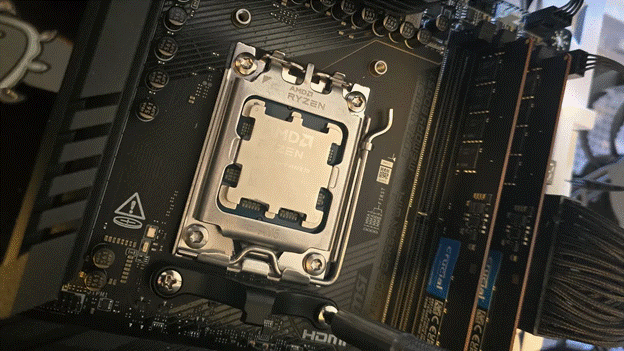
2. Place the rubber standoffs around the screw holes surrounding the CPU.

3. Take the included mounting bars and place them on top of the standoffs, and then secure them with a screwdriver and the included screws.

4. Apply the included Arctic MX-6 thermal paste to your CPU. If you aren’t sure how to do this properly, please refer to our handy guide on how to apply thermal paste.
5. Press the pump block on top of the CPU, and secure the built-in screws using a screwdriver.

6. Once complete, place the 6.7-inch display on top of the CPU block and connect the included cable to a USB header, as well as the AIO’s PWM and ARGB cords.

Real world testing configuration – AMD AM5 platform
The 9950X3D setup we started testing coolers with last year has suffered an unfortunate death. As such, we’ve begun to test coolers on a system with AMD’s 9950X.
There are some differences in how the 9950X and 9950X3D CPUs are impacted by thermal events. While the heat output of the CCDs of AMD’s 9950X3D are relatively balanced, the 9950X I’m using has one CCD that runs much hotter than the other – with a difference of over 10C in some scenarios, shown below.

The benchmark results shared in these reviews may differ from others because I place an emphasis on having results that are comparable to real-world use.
This means that I generally test CPU coolers inside of a closed desktop case, which increases cooling difficulty compared to other testing methods. Some reviewers will test CPU coolers outside of a case, on an open test bench. Open benches have lowered ambient temperatures, which in turn makes weak coolers appear stronger than they really are. Some publications have also used generic thermal plates to test cooling solutions. I reject both of these methods because they don’t accurately reflect the real-world conditions where a CPU cooler is.