Corsair's Scimitar RGB Elite gaming mouse hits an all-time low of $49 — 17 programmable buttons built for MMO gaming
17 buttons for fingertip access to your favorite spells and abilities
Get 3DTested's best news and in-depth reviews, straight to your inbox.
You are now subscribed
Your newsletter sign-up was successful
There isn't a massive repertoire of MMO mice on the market compared to what's available for FPS gaming. The obvious need for mice with 17+ buttons is fairly niche, but if you happen to be an MMO gaming enthusiast, then you know how a multi-button MMO mouse can drastically improve your gaming life. So if you want to try something different from an expensive SteelSeries Aerox 9 or Razer Naga, then take a look at Corsair's Scimitar RGB Elite gaming mouse, on sale at Amazon for its all-time low price of $49.99. You're saving a tidy $40 off the $89.99 list price in this Big Spring Deal.
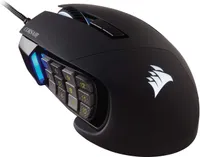
Corsair's Scimitar RGB Elite mouse shares a similar look across the Scimitar range, with striking looks and a shape that's designed to contour the hand, with a finger rest for those digits that aren't busy clicking. This wired model features a PixArt PMW3391 sensor with a native 18,000 DPI, adjustable in 1 DPI resolution steps for accurate configuration to your liking.
The Corsair Scimitar RGB Elite is a solidly constructed mouse that is reasonably heavy compared to other available MMO mice, and feels like a brick compared to any 60-gram ultralightweight FPS mice that are available for esports. But the weight makes the Scimitar RGB Elite very stable, and the heft in your hand feels reassuring. I used to own one of these mice and easily recommend one at this low price.
There are 17 programmable buttons on the Scimitar: 12 on the side panel, the left and right primary mouse buttons, two DPI switch buttons above the scroll wheel, and the scroll wheel's center click. All of these buttons can be mapped to your choosing through Corsair iCUE software.
The Scimitar RGB Elite mouse from Corsair features 17 programmable buttons, including 12 located on the side panel, the left/right primary mouse buttons, two DPI switch buttons above the scroll wheel, and the scroll wheel's center click. You can slide the 12-button side panel to fit your hand size.
One of the standout features of the Scimitar is that the sliding 12-button side panel on the Scimitar can be moved forward or backward approximately 1/4 of an inch, so you can line up the 12 buttons to your thumb for a customized fit, giving you less hand strain and fatigue. To adjust the side panel, you just need to loosen a small screw on the underside of the mouse using the included hex key. Tighten the screw back up when you've decided upon the best location.
If you're looking for more savings, check out our Best PC Hardware deals for a range of products, or dive deeper into our specialized SSD and Storage Deals, Hard Drive Deals, Gaming Monitor Deals, Graphics Card Deals, Gaming Chair, Best Wi-Fi Routers, Best Motherboard, or CPU Deals pages.

Get 3DTested's best news and in-depth reviews, straight to your inbox.

