3DTested Verdict
The screen is definitely a gimmick, but otherwise the RT82 is a quiet, hot-swappable keyboard that feels good, can handle gaming, and costs less than $90.
Pros
- +
Very quiet
- +
Quick / accurate typing experience
- +
LCD screen
Cons
- -
All plastic
- -
LCD screen isn't very useful
- -
Different software to customize keyboard and screen
Why you can trust 3DTested Our expert reviewers spend hours testing and comparing products and services so you can choose the best for you. Find out more about how we test.
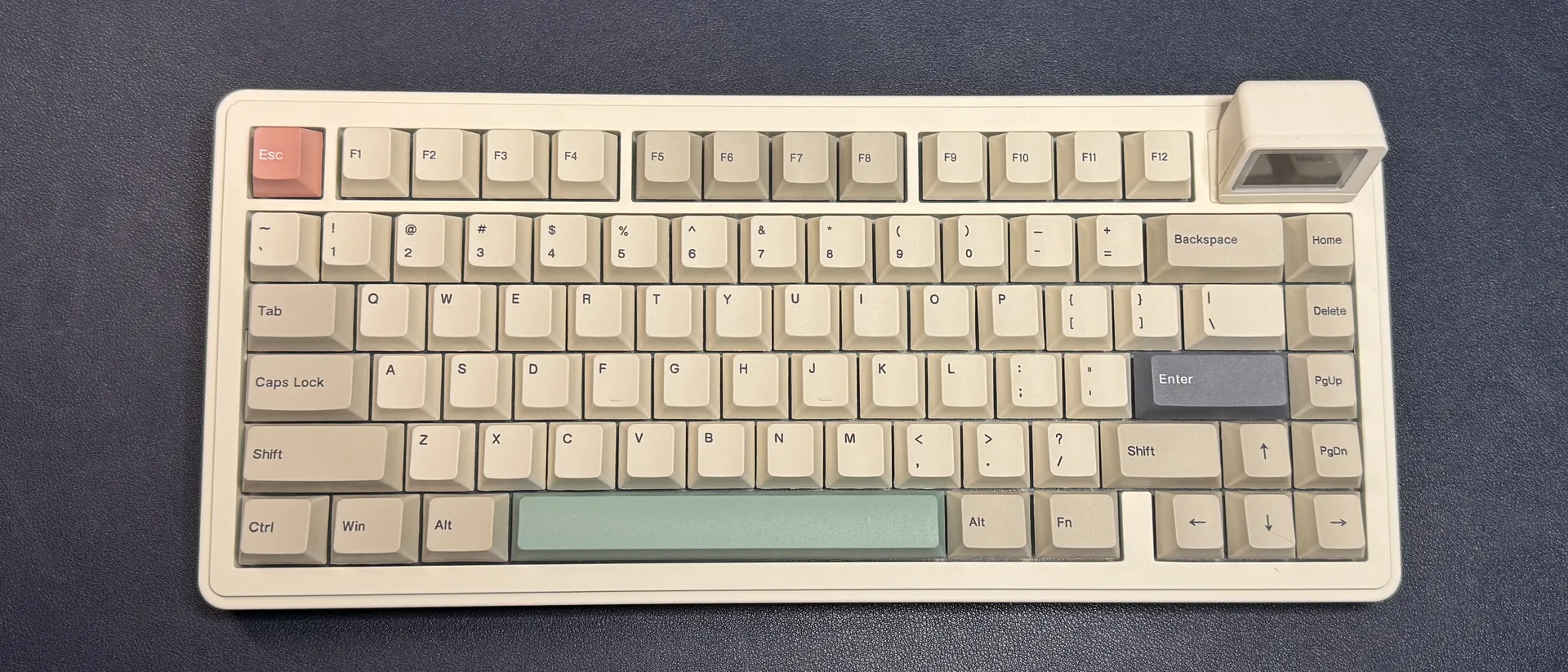
Remember when all electronics came in the same general color scheme of off-white / beige / slightly gray? While Epomaker's RT82 isn't quite as gimmicky as 8BitDo's NES-inspired retro keyboards, it's still a little gimmicky. It features an off-white all-plastic case with light gray accent keys, and in the upper-right corner, you'll find a magnetic detachable mini color LCD screen designed to look like an old-school computer monitor. The screen displays whatever you want it to: the date/time, a custom picture or gif, or your keypresses in real time.
But we're not looking at the RT82 for its screen (which is detachable, anyway). This 75-percent wireless mechanical keyboard is extremely quiet, with hot-swappable switches, lower-profile dye-sub PBT keycaps, and five layers of sound dampening in the case. It also features a 1,000 Hz polling rate and N-key rollover, so you can use it for work or play. It comes in one color (with two switch options) and normally retails for $85.99 but is currently on sale for $77.39 at Amazon. While it's not the absolute cheapest keyboard we've seen, its current sale price puts it right within the price range of our best budget mechanical keyboards.
Design and Construction of the RT82
The RT82 is a retro-inspired wireless mechanical keyboard with a 75-percent layout — that means it has alphanumeric keys, arrow keys, and a full function row, as well as a single column of navigation keys (Home, Delete, PgUp, and PgDn). In the top right corner, where many 75-percent boards have rotary knobs or a couple of extra navigation keys, the RT82 has a mini LCD screen designed to look like a retro monitor. The screen attaches magnetically via pogo pins (which is probably a good thing, as it means you can store the keyboard without worrying about snapping the screen off).


The keyboard is fairly compact, measuring 12.86 inches (326.7mm) wide by 5.64 inches (143.2mm) deep, and is about 1.57 inches (39.8mm) high (at its thickest point but not counting the detachable "monitor"). The front of the keyboard is 0.86 inches (21.8mm) high — not so high that you need a wrist rest to be comfortable, but you might still want one. It weighs just under 2 pounds (1.94lbs / 879g).


Unlike a lot of mechanical keyboards on the not-quite-gaming side, the RT82 features an all-plastic build with a matte plastic ivory case and dye-sublimated PBT keycaps in the same color, with light gray accent keys (plus three one-off accent keys in salmon, sage green, and dark gray). The keycaps have printed legends — not shine-through, though the keyboard does have per-key RGB backlighting that shines fairly brightly through the keys.

The LCD screen is housed in a small plastic box, and measures 1.14 inches diagonally and sits about 1.18 inches (30mm) above the keyboard. This makes the total height of the keyboard just under 3 inches (76.2mm), for those of you who are thinking about clearance for storage. In its default state, the screen shows the time, date, battery life, and a few board-specific statuses (Win/Mac mode, connection type, Caps Lock, and Scroll Lock). The screen can also be customized to display up to three personal pictures or GIFs, or it can be set to display your key input in real time.


The bottom of the keyboard has four small rubber strips to keep it from moving around your desk, as well as two sets of plastic flip-out feet to adjust the keyboard's angle. The default angle is 5 degrees, and the flip-out feet allow you to adjust it to 7.5 or 11 degrees. The keyboard's USB-C port is located along the top left; next to it, you'll find a power switch for switching between connection types, and a handy storage space for the board's 2.4GHz wireless dongle.
In the box, the RT82 comes with several accessories: the detachable mini LCD screen (packed separately), a 2-in-1 switch and keycap puller, a 6-foot (1.8m) white, braided detachable USB-C to USB-A cable, and 2.4GHz wireless dongle (stored in its storage space on the board), extra keycaps for Mac users, and a couple of extra switches.
Specs
Size | 75% |
Number of keys | 80 |
Switches | Epomaker Sea Salt Silent (linear) |
Backlighting | Yes / No |
Onboard Storage | Yes / No |
Dedicated Media Keys | Yes / No |
Game Mode | Yes / No |
Additional Ports | 0 |
Connectivity | 2.4GHz wireless, Bluetooth, wired (USB-C) |
Cable | 6ft / 1.8m USB-C to USB-A |
Keycaps | Dye-sub PBT |
Construction | Plastic chassis |
Software | QMK / VIA |
Dimensions (LxWxH) | 12.86 x 5.64 x 1.57 inches / 326.7 x 143.2 x 39.8mm |
Weight | 1.97lbs / 879g |
MSRP / Price at Time of Review | $85.99 / $77.39 |
Release Date | Dec. 2025 |
Typing and Gaming Experience on the RT82
The RT82 comes with your choice of Epomaker's Creamy Jade or Sea Salt Silent switches. Our review unit came with the Sea Salt Silent switches, which are silent, pre-lubed linear switches with an actuation force of 45g. They're extremely quiet and smooth, with a soft, cushiony bottom-out — though I think I'd prefer if the actuation force were slightly lighter. Of course, the board has a hot-swappable PCB, so you can also swap in your own switches.
The keyboard comes with dye-sublimated PBT keycaps in a Cherry profile, which is lower-profile than the traditional OEM profile and features sculpted rows. The caps have a soft, slightly textured finish and lightly curved tops, with printed legends.

Typing on the RT82 is pleasant, if a little too soft and quiet for my liking. The low-profile keycaps mean your fingers aren't traveling quite as much, and while the keypresses are soft, they're not at all mushy. The board is gasket-mounted, with five layers of sound-dampening material (Sandwich Latex, an IXPE switch pad, a PET sound-enhancement pad, and bottom foam and silicone) for a sound profile that is definitely very... Dampened. This is one of the quietest keyboards I've ever typed on, so if you're looking for something that won't annoy those around you, it's definitely worth a look.
Gaming on the RT82 is fine — while it's set up to allow gaming, it's definitely not a gaming keyboard first. It does feature N-Key rollover and a 1,000Hz polling rate (both wired and wireless), as well as bright, south-facing per-key RGB lighting, so it's got everything most people need in a gaming keyboard. But it doesn't come with things like dedicated media keys or gamer-ready software. The RT82 is programmable with VIA, which is an open-source mechanical keyboard customization software. It's great for remapping keys and recording macros, but it doesn't have the features you'll find in mainstream gaming peripheral software, such as per-game presets or an easy-to-enable game mode.
Features and Software of the RT82
To customize the RT82 with VIA, you'll need to have the keyboard's.json file (which you can download here). Then, all you do is plug the keyboard in, navigate to VIA, connect the board, and then load the.json file in the design tab. Then, you'll be able to remap keys, record and save macros, and customize the keyboard's RGB backlighting.
The LCD screen is customizable via a different web-based app, which is... Clunky, but understandable, as VIA is a generic software. The only thing you can customize on the screen are the custom images/gifs you can add (up to three); the other two screen modes cannot be customized. To add your own images, you'll need to navigate to Epomaker's LCD Screen Driver Software and connect the keyboard. Once it's connected, you can upload three of your own images and edit them (color adjustment, text, drawing) in the software. Then you can save your images to the keyboard and cycle through the screen's three modes with the Fn + Enter shortcut.


The RT82 is a wireless keyboard with three modes of connectivity: 2.4GHz wireless, Bluetooth, and wired(USB-C). It sports a 4,000 mAh battery that lasts up to 14 hours with the screen and RGB backlighting turned on, which isn't great but also isn't unexpected. With the RGB lighting turned on and the screen turned off, you can expect around 17 hours, and with the RGB turned off and the screen turned on, around 45 hours. You should get around 115 hours with both turned off, which is pretty solid.
The Bottom Line
The Epomaker RT82 will appeal to those who like its retro styling and soft, quiet keypresses. It’s a budget-friendly hot-swappable mechanical keyboard with a surprisingly pleasant typing experience that can also hold its own in most gaming situations. The screen is definitely a gimmick, but at least it's detachable — in theory, this means Epomaker could make alternate accessories (such as a knob or... Something else) that you could swap in, if you didn't want the screen, but there are no such accessories as of this writing.