3DTested Verdict
The Astro A50 X is a comfortable, great-sounding wireless headset, but you probably don't need it unless you have multiple consoles at one station. And you can't use it unless you're near the base station.
Pros
- +
Connects to multiple devices easily
- +
Comfortable
- +
Sounds great in games
Cons
- -
Bluetooth only works within range of the base station
- -
Expensive
- -
Earpads feel cheap
Why you can trust 3DTested Our expert reviewers spend hours testing and comparing products and services so you can choose the best for you. Find out more about how we test.
The best gaming headsets are often set up to connect to multiple devices — after all, if you've got a PC and a console (or two), you don't want to have to buy a separate headset for each. And some gaming headsets are designed to connect to multiple devices at once, like Logitech's Astro A50 X.
The Astro A50 X is a wireless over-ear (circumaural) gaming headset designed for multi-device use — it comes with a powered base station that acts as a wireless charging dock and can connect to your PC, PlayStation 5, and Xbox at the same time. It has a lightweight, comfortable design with easy-to-replace parts and offers simultaneous dual-wireless connectivity between any of those three devices and Bluetooth, but with one (big) caveat: All connections, including the Bluetooth connection, are routed through the base station, which means that you need to be within range of the headset’s dock for it to work. It's a great-sounding headset, thanks to Logitech's 40mm Pro-G graphene drivers, and the multi-device situation works seamlessly, but it's pricey for something you can only use in one place — it retails for $400, and even its current sale price of $350 is still far above that of most premium gaming headsets.
Design and Comfort of the A50 X
The Astro A50 X is a wireless over-ear (circumaural) gaming headset with a flip-to-mute boom mic and a wireless base station designed to connect to multiple devices at once.


The A50 X has moderately large, angular earcups that swivel (90 degrees), tilt, and are independently height-adjustable. The earcups are attached to the headband with a sturdy metal cylinder, and slide up and down for adjustment — approximately 1 inch (25mm) of adjustment on each side, for a total internal headband measurement of just over 12 inches (300mm). The headband is a lightweight plastic frame with fabric-covered foam padding at the top. It's very flexible, and the padded part is inside the frame, which allows it to tilt to better accommodate the shape of your head. It allows for a very comfortable fit, as long as your head isn't too big. The padded section is designed to be easily replaceable, and it just snaps out of the frame.


The foam-padded earpads are covered in fabric, which isn't uncomfortable but looks and feels a little cheap. I also found that the fabric kept snagging on my earrings (granted, I have several piercings on the surface of my ear; specifically, this kept snagging on my forward helix and double flat piercings). While this was definitely due, in part, to the jewelry and the piercing locations, this is the first time I've had it happen with a gaming headset, ever. The earpads are super easy to replace — they're attached magnetically — which is nice, though the headset doesn't come with alternate earpads like the Logitech G Pro X 2 Lightspeed. This feels like a let-down, especially given how much the headset costs.

The headset's on-ear controls are all located on its right earcup, along the edge and on the speaker plate. There's a power switch with an LED indicator light near the top, a quick-switch button that lets you quickly switch between devices connected to the base station, a Bluetooth button, and a Bluetooth volume wheel. The speaker plate has tilt buttons to control the mix between game and chat audio (forward for game audio, backward for chat audio). There's also a USB-C charging port on the right earcup, for when you want to charge the headset without the base station. The left earcup has no buttons or ports, just the flip-to-mute boom microphone attached to the speakerplate.


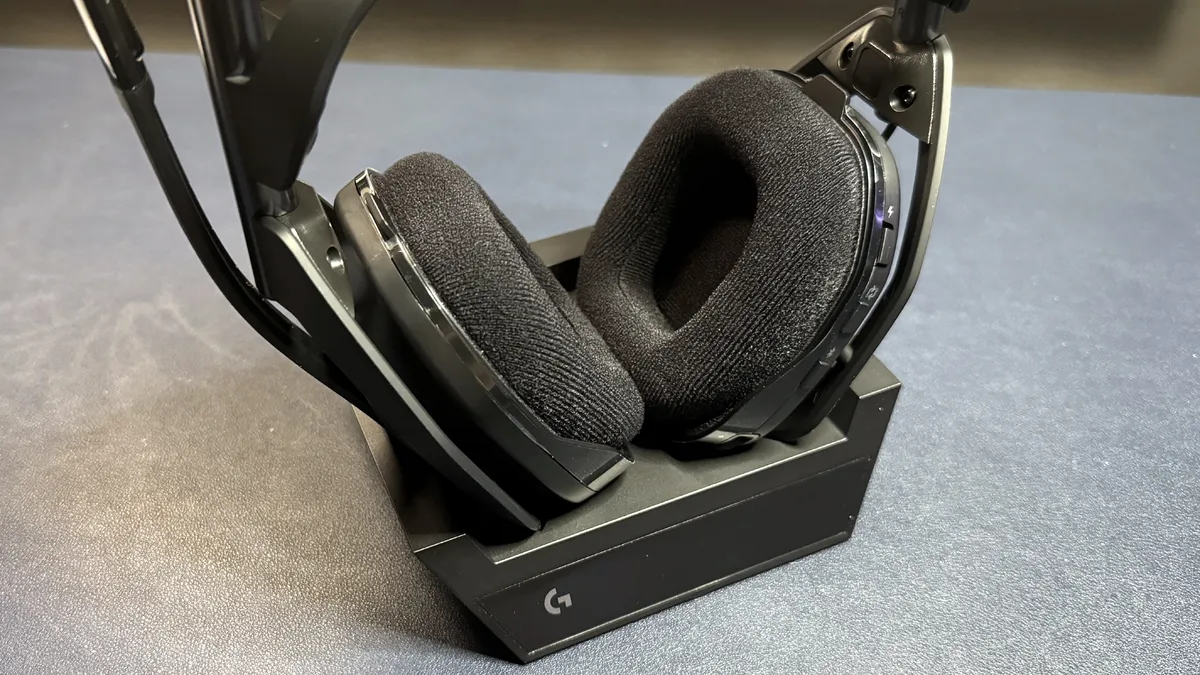

The wireless base station is a medium-sized, plastic rectangle with angular edges, measuring approximately 5.75 inches (146.05mm) wide by 4.75 inches (120.65mm) deep, and is 1.5 inches (38.1mm) high. It has a screen that indicates connectivity and battery life/charging status. On the back of the base station, you'll find six ports: Three USB-C and three HDMI (two HDMI In, for PS5 and Xbox, and one HDMI Out, for a TV).

The headset comes with a few accessories in the box: the wireless base station, a 6-foot (1.8m) USB-C to USB-A cable, a 6.5-foot (2m) dual USB-C to USB-A / USB-C to power cable, and four plug attachments for the power cable.
Specs
Driver Type | 40mm Pro-G Graphene dynamic |
Impedance | 35Ω |
Frequency Response | 20 - 20,000 Hz |
Design Style | Over-ear (circumaural) |
Microphone Type | Omnidirectional boom mic |
Connectivity | 2.4GHz wireless, Bluetooth |
Weight | 12.8oz / 363g |
Cord Length | 6.5ft. / 2m USB-C to USB-A / USB-C to power |
Battery Life | 24 hours |
Lighting | None |
Software | Logitech G Hub |
MSRP / Price at Time of Review | $400 / $349.99 |
Release Date | Oct. 2024 |
Audio Performance of the A50 X
The A50 X sports Logitech's 40mm Pro-G Graphene dynamic drivers, with a frequency response range of 20 - 20,000 Hz, which is the normal frequency range for gaming headsets. There are a few other gaming headsets with graphene drivers, including the Logitech G Pro X 2 Lightspeed and the Corsair Virtuoso Pro. Graphene drivers are more rigid than traditional dynamic drivers, which allows for more precise, detailed audio that's less prone to distortion.
Music on the A50 X sounds pretty good out of the box, but graphene drivers aren't my favorite for pure listening. The A50 X has a slightly bass-heavy sound profile, which can be tweaked in Logitech's G Hub companion software. Despite being slightly bass-heavy, I wouldn't say the bass was impressively powerful — it was loud without being muddy, but it lacked the lower-range power you'll get in headsets with a wider frequency range, such as the Audeze Maxwell 2. Mids and highs sounded good; the strings at the beginning of Britney Spears' Toxic were bright without being too shrill, even at higher volumes, and there was almost no distortion in the runs of David Guetta's Titanium (ft. Sia).
Where the A50 X really shine, however, is in gaming. The graphene drivers do an excellent job of picking up and maintaining detail, even in dramatic, bass-heavy cutscenes and layered multiplayer city environments. It also does a great job with directional audio. I've been playing a lot of Where Winds Meet, which relies perhaps a little too heavily on directional audio cues, and I was impressed with how easily it was to follow those cues while wearing this headset. For competitive gamers, directional footsteps and gunshots come through crystal clear.

The headset has simultaneous dual-wireless connectivity that works with all devices — you can simultaneously connect to a Bluetooth device and your PC, PlayStation, or Xbox, and listen to audio from both devices at the same time. While this is a nice feature, there is one big limitation: The headset needs to be within range of the docking station for Bluetooth to work. That's right: This headset doesn't work at all on its own. So you won't be able to travel with it, or even walk across the house with your phone.
While the simultaneous dual-wireless connectivity works very well — the headset connects to everything, and stays connected, seamlessly, and audio is easy to control. The volume wheel controls overall audio. And between that and the chatmix controls on the speakerplate, I never had any issues quickly switching between devices and mixing audio, which is almost always a bit confusing on other headsets with simultaneous dual-wireless connectivity. I do understand why the A50 X has Bluetooth connectivity, as I often use my phone while I'm sitting at my PC. But if I bought a $400 headset advertised as having Bluetooth connectivity, I would absolutely expect that connectivity to extend beyond the 40-foot range of the base station.
Also, the Bluetooth connection isn't as strong as the 2.4GHz wireless connection: While the 2.4GHz wireless connection didn't start degrading until I was on the other side of my apartment (the normal range for wireless gaming headsets), the Bluetooth connection was already unusable in my bathroom (which is about 10 feet from my office) with the door partially closed.
Microphone of the A50 X
The A50 X has an omnidirectional flip-to-mute boom microphone that sits at the end of a flat, flexible gooseneck arm. The arm, including the mic, is about 7 inches (177.8mm) long and bends toward your mouth for better pickup. The arm also swivels lower than most. Flipping the microphone all the way up mutes it, and there's a small bump when it's all the way up and muted, which can be easy to miss — I would like some sort of auditory cue when the mic mutes, but that might just be me being paranoid about microphones.

The mic sounds very good out of the box — it's not broadcast-level, but it's close. My voice came through loud and clear when I was speaking over Discord and Google Meet, and sounded full and crisp in recordings. There was more sibilance and distortion in volume spikes than I heard on the Razer BlackShark V3 Pro. But the mic is about average when it comes to omitting background noise; this improves when you turn on noise gate in Logitech's G Hub software, but it's not particularly impressive.
Features and Software of the A50 X
The A50 X doesn't actually have that much to customize, but it can be configured via Logitech's G Hub software or via its mobile app (Logitech G). The mobile app is handy for PS5 / Xbox users who aren't also connected to a PC. The software has just three screens: Headset EQ, microphone EQ, and routing. Logitech includes a couple of EQ presets for both the headset and the mic side, and you can also find and download more presets provided by the community. Routing is where you can set up and mix audio for streaming output.


You can also change some of the A50 X's device settings, including power management (time to sleep), base station brightness, and tones (all, minimal, or none), and adjust the mic's sidetone in the settings screen.
Battery Life of the A50 X
Logitech rates the A50 X's battery life at 24 hours, which is definitely below average for premium wireless gaming headsets in today's market, but is also not too much of a hindrance, considering you can't take these too far from the base station, where it charges. There are other headsets with base stations that have similar battery life, such as the SteelSeries Arctis Nova Pro (22 hours) — but the Arctis Nova Pro has a hot-swappable battery system that charges in the base station for "essentially unlimited" battery life. The HyperX Cloud Alpha 2, on the other hand, has a base station and simultaneous dual-wireless connectivity and gets up to 250 hours (with only one wireless connection active) or 125 hours (with dual-wireless connections).
Bottom Line
The Astro A50 X is an interesting headset that's perfect for very, very specific setups. If you have a gaming setup with a PC, a PlayStation, and an Xbox all in one place, and you need a headset for that setup and only that setup, the A50 X is exactly what you're looking for. It sounds great, especially for gaming, and — more importantly — it connects to all of your devices and lets you easily and seamlessly switch between them, while also letting you mix in audio from your phone or other Bluetooth device.
But if you don't have all of these devices in one place, and/or you're looking for a headset you can use anywhere else, the Astro A50 X is not for you. Just about every other wireless gaming headset with built-in Bluetooth is a better option, since you absolutely cannot travel with the A50 X. Even the HyperX Cloud Alpha III, which only has 2.4GHz connectivity and no Bluetooth, is a better option for travel, as it has a USB-C dongle that you can easily take with you — not a powered base station.