3DTested Verdict
The Arzopa Z3FC is a remarkable value in the portable monitor segment skewed towards a gamer audience.
Pros
- +
Attractive pricing
- +
Large 16.1-inch panel with 1440p resolution and 180 Hz refresh
- +
Good build quality
- +
Includes sturdy sleeve for storage
Cons
- -
Speakers could be better
Why you can trust 3DTested Our expert reviewers spend hours testing and comparing products and services so you can choose the best for you. Find out more about how we test.
Arzopa is no stranger here at 3DTested. The company makes portable monitors that are often loaded with functionality but won’t break the bank. The Arzopa A1 is among the best portable monitors, taking the crown in the budget category, and the Z3FC has the potential for inclusion among the best of the best.
The Z3FC features a relatively large (for a portable monitor) 16.1-inch IPS panel, a 1440p resolution, and a maximum refresh rate of 180 Hz (triple that of most portable monitors). Arzopa offers all of this with current street pricing of around $144.
Design of the Arzopa Z3FC
Like other Arzopa portable monitors, the Z3FC stands out from competitors by using an aluminum-alloy chassis instead of bendy plastic. Aluminum allows for a stiff chassis that resists flexing and gives the Z3FCa a more premium feel.
The chassis itself features a dark gray finish, with thin bezels along the top and sides. A more prominent bezel (or chin) sits below the 16.1-inch panel. Here you’ll find Arzopa branding front and center. All port activity takes place on the left side of the display, where you’ll find two USB-C 3.1 (DisplayPort Alt Mode) ports and a mini-HDMI 2.0 port. Some cheaper monitors get by just providing two USB-C ports, so it’s nice to see that Arzopa throws in an HDMI port for broader compatibility (a miniHDMI to HDMI cable is included in the box, along with two USB-C cables).


Speaking of USB-C cables, one of them has a 180-degree bend so it doesn’t stick out on the left side of the monitor. It’s just one small step beyond the 90-degree cables that some manufacturers include with their monitors, but it goes a long way toward making cable management easier, as the cable easily snakes behind the screen.

Also on the left side of the display are the controls for volume/brightness and the on-screen display (OSD). The Z3FC features two 1-watt speakers, one on each side of the display.
The final defining characteristic of the Z3FC is a thin kickstand on the back. If you’re looking straight at the screen, the kickstand is on the back, right side of the device. The angle is adjustable, and when not in use, it sits flush with the body of the Z3FC. Because of the kickstand's position, the Z3FC can be used in either landscape or portrait mode, depending on your needs.
Arzopa even includes a carrying sleeve to protect the screen while traveling.
Arzopa Z3FC Portable Monitor Specifications
Panel Type / Backlight | IPS / WLED |
Screen Size / Aspect Ratio | 16.1 inches / 16:9 |
Max Resolution & Refresh Rate | 2560 x 1440 @ 180 Hz over DisplayPort (144 Hz over HDMI) with AMD FreeSync support |
Color Depth | 8-bit |
Max Brightness | 400 nits |
Contrast | 1,000:1 |
Ports | 1x Mini-HDMI, 2x DisplayPort (USB-C Alt Mode) |
Speakers | 2 x 1-watt |
Dimensions | 14.41 x 8.98 x 0.36 inches |
Weight | 1.71 pounds |
On-Screen Display for the Arzopa Z3FC Portable Monitor
Like other Arzopa portable monitors, the Z3FC features a barebones OSD that can be used to adjust basic picture settings. The top button serves as power and as a back button in the OSD. If you hold the button for three seconds, it powers off the monitor. While you’re in the OSD, pressing it once will go back one menu.


The rocker switch has multiple uses. If you’re not in the OSD, pressing up brings up the brightness control, and you can then move the rocker up or down to adjust brightness. If you first press down, it shows volume controls; you can then adjust the volume up or down. When you’re in the OSD, the rocker can be used to navigate up and down through the menu system. Finally, there’s an action button that lets you select submenus and individual options within the OSD.
Once in the OSD, you’ll find the standard picture controls (brightness, contrast, sharpness, etc.), along with options for color temperature, sRGB mode, and DCI-P3. There are further settings for overdrive, enabling AMD FreeSync, and switching HDR modes.
Image Quality and Performance of the Arzopa Z3FC Portable Monitor
The Z3FC features a slightly larger panel size than what we typically find on portable monitors – it measures 16.1 inches across instead of 15.6 inches. And with that extra size also comes additional pixels. Instead of the standard 1920 x 1080 resolution that is the norm in this class, the Z3FC bumps it to 2560 x 1440. The monitor also features a matte, anti-glare finish.
Arzopa also ups the ante with refresh rate, as the Z3FC triples the segment-standard 60 Hz refresh rate to 180 Hz. However, there is a caveat: 180 Hz is only available when using the USB-C ports. If you opt to connect using an HDMI cable, you’re limited to a still respectable (for a portable monitor) 144 Hz refresh rate. The Z3FC also supports AMD FreeSync, allowing it to pair with a handheld gaming PC like the Lenovo Legion Go.
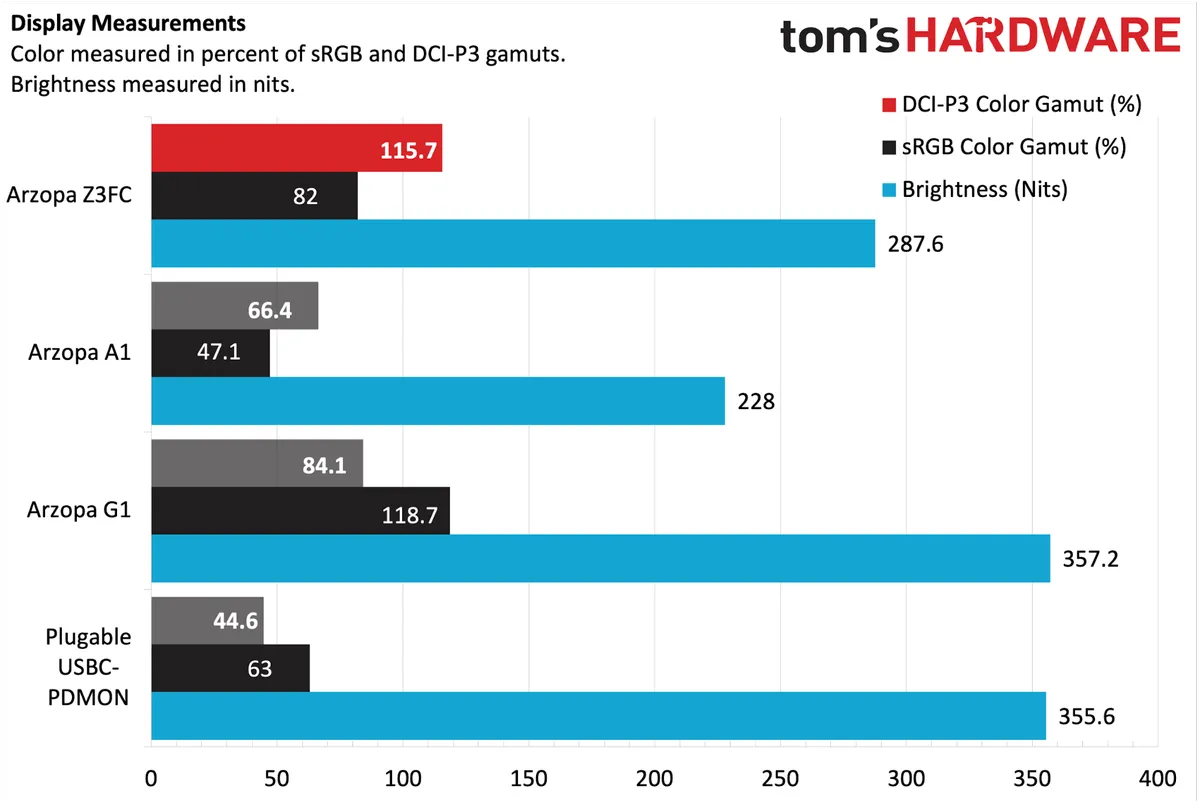
Arzopa specs the Z3FC’s IPS panel with a contrast ratio of 1,200:1 and a maximum brightness of 400 nits. However, in the default display mode, we only managed a maximum brightness of 287.7 nits. Even in the FPS display mode, maximum brightness reached 322.6 nits in our testing.
The Z3FC made up for its brightness shortfalls in our instrumented color tests. Here, the monitor covers 115.7 percent of sRGB and a respectable 82 percent of DCI-P3. While it’s not going to give OLEDs a run for the money in overall picture quality, the Z3FC looks good, overall, to my eyes across multiple devices (Mac Mini, Legion Go, HP Omnibook X).
During my time with our review sample, I was comfortable setting the display brightness to around 55 percent in my brightly lit home office. I did some productivity work on a Mac Mini using the monitor connected via the HDMI port. I also connected the Z3FC to a first-generation Lenovo Legion Go via USB-C and played a couple of games (Red Dead Redemption 2, Forza Horizon 5) with an Xbox One Series X controller.
Audio on the Arzopa Z3FC Portable Monitor
Like the cheaper A1, the Z3FC features two 1-watt speakers – one on each side of the panel. The speakers are perfectly suited for joining Google Meet or Microsoft Teams meetings, or watching your favorite influencer on YouTube.
However, music isn’t exactly the forte of the Z3FC. While the volume is loud and there’s very little distortion when cranking to near 100 percent, there’s a distinct lack of bass, and both speakers sound tinny overall. What’s passable for regular speech falls flat for most music that I listened to, including a nearly 20-minute live jam session of Seek Up by Dave Matthews Band.
At the nearly $150 price point, I expected a bit better sound from the Z3FC, but instead, they’re no better than the speakers on the sub-$100 A1.
Bottom Line
If all you want is a cheap portable monitor that will suit you well for expanding your available screen real estate past your laptop screen, Arzopa will gladly sell you the A1 for well under $100. However, if you want something with more performance credentials and a better overall screen, it’s hard to say no to the Z3FC. With its 180 Hz maximum refresh rate (via USB-C) and a higher-resolution 1440p panel, it’s a boon for mobile gamers.
With a price tag approaching $150, the Z3FC is stretching into the upper end of the affordable portable monitor segment. However, it’s still well below that of more premium options from companies like Espresso. I just wish that Arzopa could have found a way to squeeze in better speakers for the price.