Laptops are some of the most important tools people use today. Whether you're a student submitting homework, at work typing away at documents, spreadsheets or presentations, or you're just someone who wants to access resources online and connect with family and friends, you want a notebook with the components and features you'll need to get the job done. That means a great screen, a comfortable keyboard, and long battery life (nice design doesn't hurt, either!). If you’re looking for a powerful laptop that easily fits in your bag and doesn’t break your back, you're looking for what some call an "ultrabook."
The “ultrabook” moniker was originally coined by Intel in 2012 and used to refer to a set of premium, super-thin laptops that met the chipmaker’s predefined standards. Much of this occurred as the PC world was first catching up to the original MacBook Air. However, just as many people refer to tissues as Kleenexes or web searching as Googling, the term ultrabook commonly refers to any premium ultraportable laptop, whether it carries Intel’s seal of approval or not.
Best Ultrabooks and Premium Laptops You Can Buy Today
Why you can trust 3DTested Our expert reviewers spend hours testing and comparing products and services so you can choose the best for you. Find out more about how we test.
The Best Ultrabook (and Mac) overall

The MacBook Air has been a go-to laptop recommendation for quite some time, thanks to strong performance, a fanless design, excellent built quality, and long-lasting battery life. With the version of the chip with M5, you get the benefits of years of hardware revisions since the Air's last redesign with M2, including a minimum 16GB of RAM and a 12-megapixel webcam.
The M5 chip in the MacBook Air showed off excellent single and multi-core performance. In fact, it;s closest rival was the same chip in the MacBook Pro, which gets a boost because of an active fan.

That being said, the system can throttle under heavy workloads like rendering. But for most people's typical tasks, including writing, editing, making spreadsheets, editing photos, listening to music, programming, and general multitasking, you'll have a very powerful machine.
Apple has boosted the base MacBook Air's price to $1,099, but it now starts with 512GB of memory. Given the price of components these days, the laptop is still a great value. If you want a Mac but don't want to spend that much for it, you could take a step down to the entry-level MacBook Neo, starting at $599, as long as you're willing to sacrifice on power, memory, ports, and a backlit keyboard.
Read: MacBook Air (M5) review
The best 2-in-1 convertible

A great 2-in-1 needs all of the features of an outstanding normal laptop, including a strong build quality, a great display, and a long battery life. It just also has to flip into a tablet.
The Lenovo Yoga 9i 2-in-1 Aura Edition is a premium convertible with a beautiful, 14-inch OLED touchscreen that is far more colorful than much of the competition. Even if you question the wisdom of a 2880 x 1800 resolution on a small display, the quality of the panel here can't be denied.

Meanwhile, you also get strong build quality, a clicky keyboard, and pretty decent battery life. The 5MP webcam is good enough for professional video calls, and also comes with a privacy shutter. The Yoga also comes with a stylus in the box.
The "cosmic" blue color is fun, but still professional. There are some design quirks, like the fact that Lenovo has gone with round, shiny edges on some parts of the laptop while others are matte and flat. It's a bit funky looking, but I was able to look past it.
There are a few downsides. If you do want to open the laptop for repair, it's extremely difficult to get the bottom back on. And to open it in the first place, you have to lift up an adhesive rubber foot. Additionally, there's a lot of bloatware on the system.
We tested this laptop at $1,499.99 with an Intel Core Ultra 7 258V, 32GB of RAM, and 1TB of storage. The price has gone up since we tested it, but if you find it at this sale price again, it's a great value.
Read: Lenovo Yoga 9i 2-in-1 Aura Edition review
Incredibly Long Battery Life

The Dell XPS 14 is back, and while you might expect its performance or design to be the headlining feature, it's the battery life that wows. With its base 1920 x 1200 LCD display, which has a variable refresh rate that goes all the way down to 1 Hz, it lasted 20 hours and 41 minutes on our battery test.
That's not to say the battery life is all there is to like about this laptop. The 3-pound chassis is sleek, and Dell added a function row back to the keyboard, making it way easier to use over the touch bar of yesteryear.
If you're OK with 12 hours of charge, more expensive models with a tandem OLED display have way better colors and more powerful Arc B390 integrated graphics.
That being said, both of them have a low-travel keyboard without space between the keys, which definitely tripped up my fingers, so you'll need time to get your muscle memory going. And the starting price, at $1,600, is a lot to ask but is unfortunately common as the memory crisis rages on.
Read: Dell XPS 14 (2026) review
Another great Windows clamshell
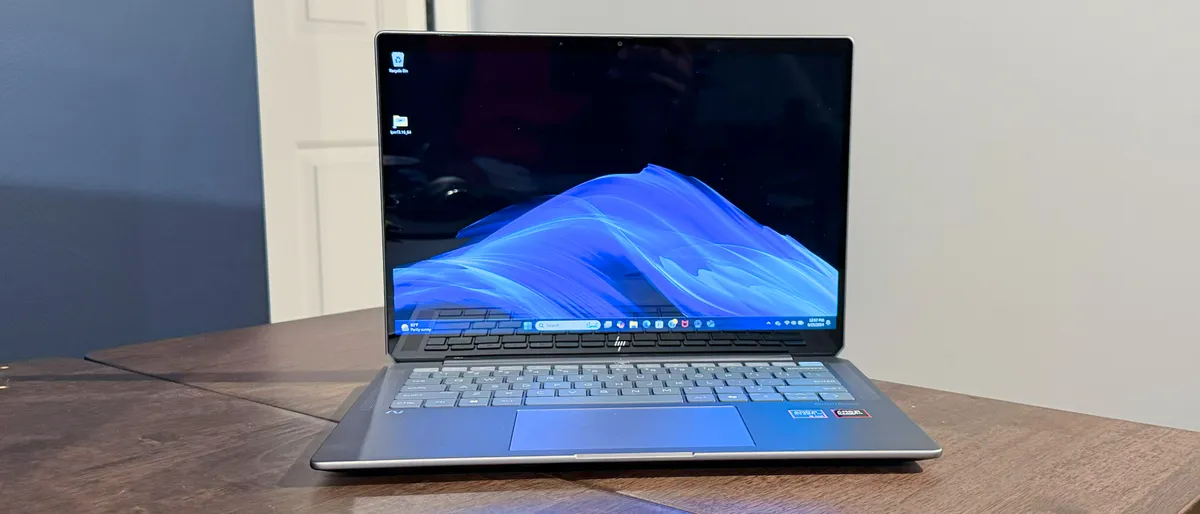
We can argue about how much the AI PC is really any sort of revolution, but there are still some strong ultraportables coming out. The HP OmniBook Ultra puts the AMD Ryzen AI 9 HX 375 in a sleek chassis with strong productivity performance.
HP is offering up decent battery life here, running for 12 hours and 52 minutes on our battery test. That's not the best, but all things considered including the high-resolution display, it's not bad. It's also nice to see Thunderbolt 4 ports on an AMD system, which is exceedingly rare.
The experience is knocked down a bit by a significant amount of bloatware, but if you're looking for a strong AMD laptop, the HP OmniBook Ultra is a strong competitor if you don't mind doing some uninstalling.
Read: HP OmniBook Ultra review
A more powerful Mac laptop

The MacBook Air is a great starting point, but if you want an air-cooled processor and a few more features, the base MacBook Pro adds a few niceties. The 14-inch MacBook Pro starts with an M5 processor, has three Thunderbolt ports (including one on the right side), and a beautiful micro LED display.
For those willing to spend an extra $150, there's a nano-texture display option that is completely worth it if you ever use your laptop outside. The matte display looks excellent, and was great on desks near windows.
If you need the most power possible, we also reviewed the MacBook Pro with an M5 Max, including a 40-core GPU, a mix of Apple's latest performance and super cores, and a blazing fast SSD.


Both the 14-inch and 16-inch laptops offer great speakers and beautiful displays, but you will have to pay quite a bit for any storage or memory upgrades you want, and you won't be able to make changes later.
Read: MacBook Pro (14-inch, M5) review
Read: MacBook Pro (14-inch, M5 Max) review
The Best Ultrabook for Work
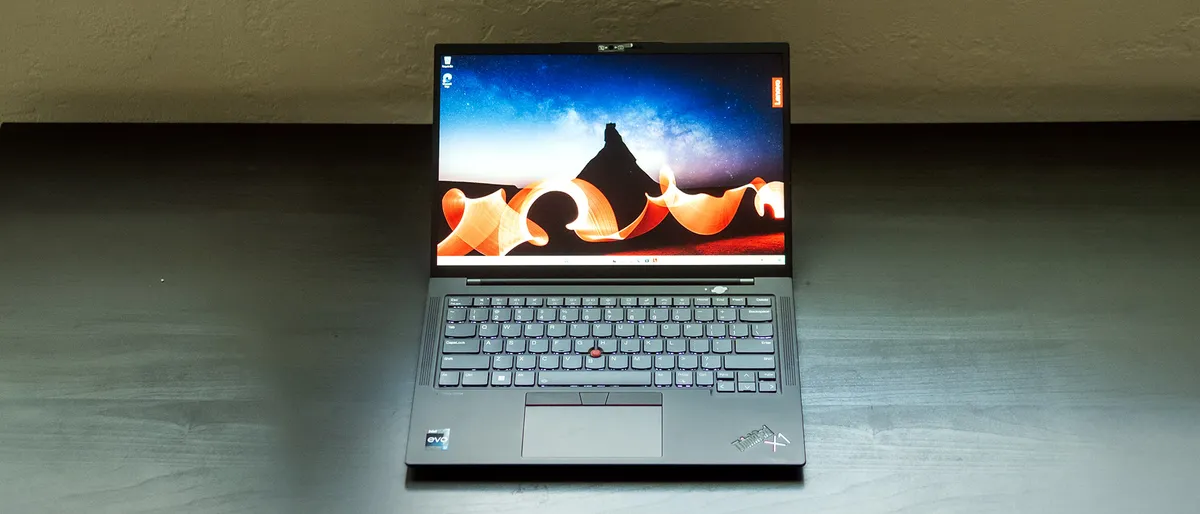
There are plenty of reasons why the ThinkPad X1 Carbon is a classic. It's thin design and strong build quality are beloved by ThinkPad diehards. The latest model, the ThinkPad X1 Carbon (Gen 11), offers long battery life and great speakers.
Perhaps most critically, the ThinkPad X1 Carbon offers an excellent keyboard. Lenovo's reputation was built on great typing experiences, so this is crucial. For those who love Lenovo's TrackPoint, it's still here, allowing you to move the mouse without ever taking your fingers away from the home row on the keyboard.
The latest version comes with Intel's 13th Gen Core processors. We reviewed it with a Core i7-1355U, 16GB of RAM and a 512GB PCIe Gen 4 SSD.
The one real issue we had is that the base screen could benefit from being a bit brighter. Those who want the most vivid experience can opt for an OLED panel, but at a higher price.
When shopping for the ThinkPad X1 Carbon (Gen 11), keep an eye out for Lenovo's frequent sales, as there's often a deal available.
Read: Lenovo ThinkPad X1 Carbon (Gen 11) Review
The Best Windows Tablet

Microsoft may push the Surface Pro as a do-it-all AI machine, but the truth is it's just a really nice, portable, slim PC that lasts a long time on a battery and includes a beautiful OLED display. It's definitively one of the best Surfaces to date.
The Qualcomm Snapdragon X Elite processors offer enough performance to keep up with x86 competitors, making this one of the first Arm-based Surfaces that doesn't feel like it's lacking. Add on more Arm-compatible apps than ever, including the Chrome browser, and there's far less to miss from previous Intel models. That's not to say it's perfect — there are still some gaming issues, as well as drivers for specialized peripherals that may need to be rebuilt for the new platform.
The 45 TOPS NPU powers some of Windows 11's Copilot+ features, like Cocreator, Live Captions, and Windows Studio effects. None of these are showstoppers, but they're cool tricks.'
If you want a premium tablet running Windows 11, the Surface Pro is one of the only premium games in town. And that means paying a premium for a separate keyboard. But for those who love this form factor, the Surface Pro remains the best option out there.
Read: Microsoft Surface Pro review
Quick Ultrabook / Premium Laptop Shopping Tips
✅ Get a good keyboard
Whether you’re using an ultrabook to browse the web, send emails, code, write, or do other productivity work, the keyboard is one of your primary ways of interacting with your computer. Get something with responsive keys that aren’t mushy. Low-travel is ok if the keys have the right feel to them, but the last thing you want to do is “bottom out” while typing. Ideally, you can try out a store model before buying.
✅ Consider what you need in a screen
At a minimum, your laptop should have a 1920 x 1080 screen. Some laptops offer 4K options, though it’s sometimes harder to see the difference at 13-inches or below. While 4K may be more detailed, 1080p screens give you much longer battery life. OLED screens are becoming far more common on laptops, with deep blacks and bright colors, but often at the cost of battery life. Many laptop screens still use a 16:9 aspect ratio, but consider 16:10 or 3:2 if you want a taller screen that shows more of your work at a time. 16:10 has become increasingly popular over the last several years, while 3:2 is more rare.
✅ Some laptops can be upgraded
While CPUs and GPUs are almost always soldered down, some laptops let you replace the RAM and storage, so you can buy cheaper now and add more memory and a bigger hard drive or SSD down the road. But the thinnest laptops may not have that option, so buy with the future in mind. Some, like the Framework Laptop 13, are designed around being easily upgradeable.
✅ Battery life is important
Aim for something that lasts for 8 hours or longer on a charge (gaming is an exception) at a bare minimum. For productivity, many laptops easily surpass this number, so 10 hours would be even better. But be wary of manufacturer claims, which don’t always use strenuous tests. Some laptops are starting to add fast charging, which is a nice bonus that tops you off more quickly.
Finding Discounts on the Best Ultrabooks
Whether you're shopping for one of the best ultrabooks or a laptop didn't quite make our list, you may find savings by checking out our lists of the latest Dell coupon codes, HP coupon codes, Lenovo coupon codes, Best Buy promo codes or Newegg promo codes.