
Selecting your first 3D printer sets the tone for your journey into a new hobby or even a small business. With so many competing brands on the market, each backed by a passionate fan base, choosing the right beginner 3D printer can feel overwhelming. Spend a few minutes in any online forum, and you’ll quickly see the divide: a machine praised as a game-changer by one group can be dismissed as a steaming pile of garbage by users who had a bad experience.
It doesn’t have to be this way. We’re here to cut through the rhetoric and brand loyalty to provide practical, experience-based guidance. We were beginners once ourselves, starting out on manually leveled machines running bare-bones firmware, long before Wi-Fi, touchscreens, or onboard cameras were standard. If we had to start over today, these are the beginner 3D printers we’d choose without hesitation.
In this guide, we’ll take a closer look at the beginner-friendly 3D printers we’d recommend for our own friends and family. These machines aren’t chosen because they’re the most popular, but because they work reliably right out of the box. We’ll break down the pros and cons of each model, with an eye toward budget-friendly options so you can choose a great first printer and still have money leftover for filament.
Quick List

Best 3D Printer for Beginners Overall
The Creality SparkX i7 is designed for new makers who want to dive into 3D printing in color without any fuss. It's similar to the Bambu Lab A1 Mini, but with a bigger build volume (260 x 260 x 255mm), and it is super easy to assemble and use. It comes with an optional CFS Lite for four-color printing, and is currently on pre-order for $339. That's a $60 saving from its original MSRP.

Best 3D Printer for Kids and Teens
The A1 Mini isn't only for adults. It's also great for kids. The Bambu Lab A1 Mini is a no-fuss 3D printer that requires minimal assembly and guarantees flawless prints, making it perfect for kids who want to try and have fun with 3D printing. It's on sale for $249 from Bambu Lab and $399 with the AMS Lite combo if your child is ready to dabble with multicolor prints.

Best Budget Beginner 3D Printer
A beginner's dream machine, the Ender 3 V3 SE is one of the most affordable bed slingers, retailing at $218. Despite its low price, Creality did not scrimp on deluxe features. It has auto bed leveling, auto filament loading, and a modern LED interface. Alternatively, the Neptune 4 Pro is a faster machine on sale for $219, but know that this does not have auto-bed leveling.
Show More ⬇️

Best for Very Young Makers
The Toybox is the Easy-Bake Oven equivalent of 3D printers. It requires no setup, is safe, and is super kid-friendly. It also features a library of free and paid premium parent-approved models and simple toy-designing tools to help your kid get started. It is available at Amazon for $229 with a coupon and $309 for the Starter Bundle at Toybox.

Best 3D Printer to Grow With Your Kid
The AOSEED X-Maker is a great starter 3D printer for kids. It is ready to use out of the box and comes with a suite of design software tools that can support your kids' creativity as they level up their design skills. It's available at Amazon for $369 with a coupn and at MatterHackers for $399.

Best User Interface for Kids
The Kidoodle MiniBox A1's 3.5-inch touchscreen is similar to an Android tablet, featuring a colorful, kid-friendly graphical interface. It is compact and surprisingly faster than many kid printers. Available at Amazon for $299, and the onboard memory includes sample models so you can start printing right away.

Best 3D Printer for STEM
The Prusa Mini+ comes semi-assembled, making it a great option for young 3D print hobbyists who aren't afraid to get their hands dirty and want to learn the mechanics and assembly of 3D printers. Not to worry - Prusa also provides excellent customer support, so help is never far away. The kit is available for $539 at Amazon and $549 on the Prusa Research site.

Best 3D Printer for Teens
The Elegoo Centauri Carbon comes with a fully enclosed chamber, does not require assembly, and is an excellent choice for teens who are interested in diving into the world of 3D printing. This $299 Core XY machine is fast and easy to use, includes a built-in camera, and can be controlled via the mobile app.

Denise has been using 3D printing as a creative outlet since 2020 when she got her first Creality CR10s. She’s been a freelance newspaper reporter, online columnist and craft blogger with an eye for kid’s STEM activities. She’s added YouTube to her social media skills and has traveled cross county and overseas to talk 3D printing with fellow makers. She's analyzed nearly 100 different 3D printers, from a tote bag sized delta to a meter wide Elegoo OrangeStorm Giga currently camped out in her living room. When she’s not building 3D printed RC cars or stirring glitter into a batch of resin, you’ll find her at the latest superhero movie with her husband and two sons.
Best 3D Printers for Beginners 2026
Why you can trust 3DTested Our expert reviewers spend hours testing and comparing products and services so you can choose the best for you. Find out more about how we test.
Best 3D Printer for Beginners Overall

The SPARKX i7 is Creality’s next gen answer to the beginner 3D printer, suitable for all ages with a little adult supervision. It’s simple to unbox, easy to understand and fun to use with an RGB status light that adds colorful personality. The machine is so quiet it can be used in a family room or homework station.
The SPARKX i7 has an optional CFS Lite for four color printing, but also works great as a single color machine. The color management system is our favorite feature, with a simple design that’s easy to operate and maintain, and can handle any size spool. We threw every spool we had at, from mini cardboard sample reels to oversized 2 KG spools and it worked without a hitch.
Retailing at $399 for the four-color combo, and as low as $339 during its early-bird launch, the SPARKX i7 offers features that were once limited to much pricier machines. Multicolor printing, a quick swap hotend, auto bed leveling, and programmable RGB indicator lights at this price point make it one of the most enjoyable ways to start 3D printing today.
MORE: Creality SPARKX i7 Review
Best 3D Printer for Kids and Teens

The best 3D printer for kids wasn’t even made for children, but that’s exactly why the Bambu Lab A1 Mini tops our list. It’s not a toy, but a full-fledged, fast and affordable power house with buckets of speed to spare. It’s simple enough that an elementary aged child can operate it with light supervision, and robust enough to serve the entire family for years to come. It’s backed by Bambu Lab’s comprehensive website, with a complete catalog of spare parts and maintenance instructions that pop up right on the printer.
The A1 Mini is accompanied by a growing line of RFID tagged filament that simplifies slicing, allowing the printer to identify the loaded material right down to the color and suggest print settings to match. It’s also able to use any 3rd party filament that fits its spool holder, like PolyMaker or Inland. This is the only youngster friendly printer on our list that can print in four colors for vibrant prints that don’t need paint.
Though it lacks software tailored for children, it does have Bambu Lab’s beginner-friendly MakerWorld website and the Bambu Handy mobile app. The website contains thousands of free print files complete with pre-sliced files that can be downloaded to the Bambu Studio Slicer or directly to the printer from the mobile app. MakerWorld also has a growing suite of MakerLab design tools that let anyone design statues and creatures with the help of AI, as well as vases, puzzles, containers and signs.
The printer is mostly assembled and only needs a few parts pressed together to get it ready for it’s first print.
MORE: Bambu Lab A1 Mini Review
Best Budget Beginner
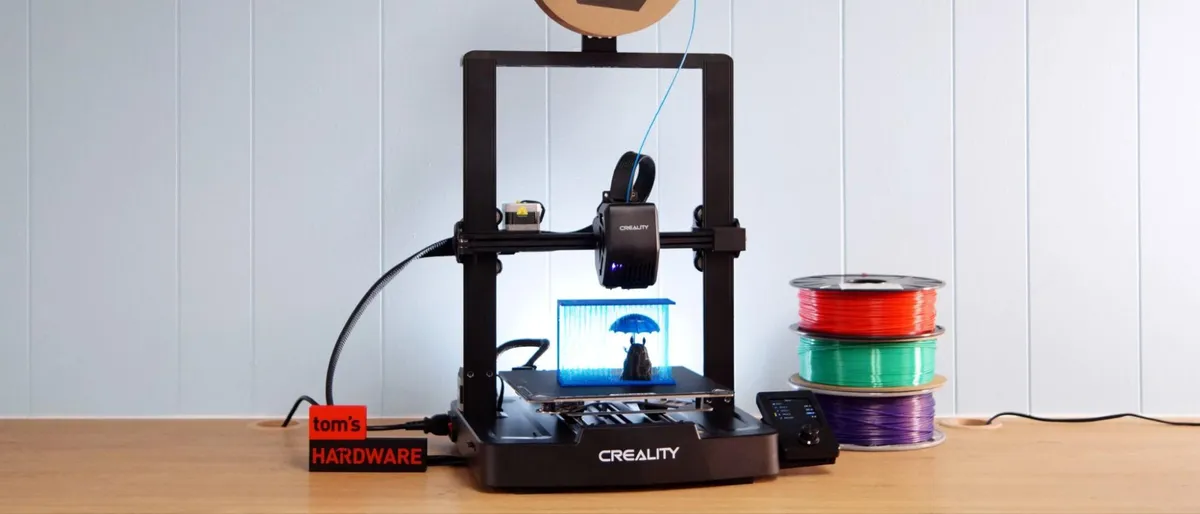
It’s hard to break the $300 floor for budget 3D printers, but Creality smashed through with the $197 Ender 3 V3 SE. This machine only takes 15 minutes to assemble, then self-levels and sets its own Z height. Its modern LED interface makes the printer simple to use and comes with complete on-screen guides to walk you through filament changes and more.
It’s not as fast as newer models, with a max speed of 250mm/s and Creality had to cut a few corners to get the price so low. It only has one Z stepper motor, a cheaper PC surface, and there’s no Wi-Fi. This means the printer does not work Creality’s mobile app, so you’ll need a PC for slicing and sneaker net for manually walking the SD card from your PC to the printer.
MORE: Creality Ender 3 V3 SE Review
Best Printer for Very Young Makers

The most well known of the kid printers, ToyBox was made to teach and entertain elementary aged children with very little need for supervision from parents. The printer is extremely basic, has few buttons and can be operated entirely from a smart device or computer.
What makes the ToyBox outstanding is its top-notch website, with a library of free and paid premium parent-approved models and simple toy designing tools. The website is heavily curated for children and restricts models with “grown up” themes like weapons or nudity. The ToyBox library of files contains many models converted from other websites like Thingiverse or Printables. ToyBox also has exclusive models from brands like Cartoon Network, DC, DreamWorks and Hanna-Barbera.
Our one problem with the ToyBox is the limited connectivity that relies on your home WiFi. We had trouble getting ours to connect to the internet, which is the only way you can download files to print. ToyBox models also can not be sent or saved for use with other brands of 3D printers, so once your child outgrows the ToyBox you can no longer use the website.
Another disappointment with the ToyBox is its lack of user serviceable parts. In a baffling move, the company considers nozzles to be covered by warranty. In order to extend the life of the printer, 3rd party filament is viewed as hazardous to the machine. This leads kids and many adults to view a 3D printer as an unserviceable appliance like a microwave, rather than a tool that can easily be fixed by the user.
The printer comes fully assembled and is practically plug-and-play.
MORE: ToyBox Review
Best 3D Printer to Grow With Your Kid

The X-Maker is perfect for elementary kids, but has advanced features to allow it to grow with your child’s skill level. It’s the best of both worlds – a fun printer that’s fully functional. It has a safety enclosure, an easy to under graphic interface, a decent sized print volume, a heated bed and a nozzle that can handle PETG or ASA when you’re ready for stronger filaments.
It comes with a suite of free kid-friendly design software that lets the user create their own toys from scratch and a simple slicer to prepare files for the 3D printer. A full feature slicer is included for advanced users. The X-Maker website also sells kits to add wind up motors or music boxes to models the user can print and build themselves.
Unlike the ToyBox, X-Maker’s designs can be saved as normal stl files and exported in order to print them on another 3rd party printer. It can also handle full sized spools of nearly any filament.
The printer comes fully assembled and is practically plug-and-play.
MORE: AOSeed X-Maker Review
Best User Interface for Kids

Superfast, compact and surprisingly robust, the Kidoodle 3D printer is a kid printer that really impressed me. The bright orange plastic shells hides a tiny, but very modern 3D printer with linear rods for speed, extra cooling and wiping system to keep the nozzle clean. Side and top panels pop off, so grownups can perform maintenance.
The machine's touch screen is more like an Android tablet with a colorful, kid friendly graphic interface. A few sample models are included in the onboard memory, which means you can print cool toys as soon as you plug it in. More models can be found on their website or easily acquired from normal public sources and sliced with Kidoodle's easy software, then brought over with a USB stick.
It has a proper PEI coated flex plate so the entire plate can be removed from the printer for easier print removal. It’s an unheated bed, so you’ll need to use a bit of glue stick to make things stick. The door is vented for cooling, and acts more as a shield to keep small fingers out of the works. If the door is opened while printing, it will pause, slide the nozzle to the side and begin to cool down for safety.
Though the build in spool holder is meant for small 250g spools, you can easily make your own table-top spool holder and use normal-sized spools.
Sunlu does brag on this machine having a max speed of 600mm/s, but like most 3D printers, it’s a bit of an exaggeration. But it is much faster than many kid printers, with a standard print speed of 100mm/s.
Best 3D Printer for STEM

An excellent choice for tweens and teens, the Prusa Mini+ can be a STEM project in of itself. Even the semi-assembled version of the Prusa Mini+ requires more assembly than most modern printers, and the kit version will have you clearing the whole weekend. Mechanically minded teens should relish the challenge and will learn a great deal about how the printer works while building it.
Like all Prusa printers, the Mini+ has 24-7 European support should you have any issues. And though the Prusa printer comes in a kit and semi-assembled offers quality with a compact size. It's not made with kids in mind, but its user-friendly features make it accessible. As a semi-assembled printer, it strikes a balance between simplicity and functionality.
MORE: Prusa Mini+ Review
Best 3D Printer for Teens
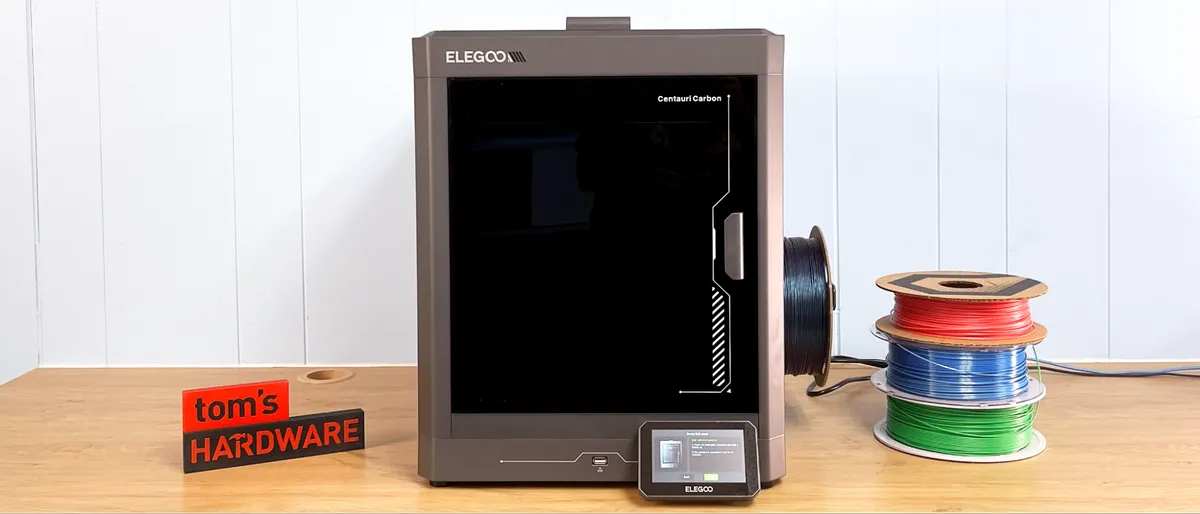
The Centauri Carbon is an excellent choice for teens who want a grown up 3D printer that’s easy to figure out. This is a “full size” 3D printer that only needs the screen and spool holder snapped into place. Since it’s fully enclosed, the printer can handle both easy printing PLA or tougher materials like ASA.
The Centauri Carbon was not “made for kids,” but it’s uncomplicated, well automated and easy to learn. The slicer (ElegooSlicer, based off Bambu Studio) can look daunting, but if you switch off Advanced Mode and stick to the defaults, you’ll still do ok.
MORE: Elegoo Centauri Carbon Review
What projects can beginners make with a 3D printer?

Beginners can make all kinds of things with a 3D printer. The obvious answer is custom toys, fidgets, and collectables, but you can also make tools and practical prints to organize your space. The possibilities are endless.
A great resource for practical 3D printing is Printables, a file library run by Prusa Research. It frequently hosts designer contests based around a theme that beginners may find interesting, like Educational Tools, Bike Gear, or Dice Towers.
MORE: Best 3D Printers
MORE: Best Budget 3D Printers
MORE: Best Resin 3D Printers